Old Calculator Museum Advertising & Documentation Archive
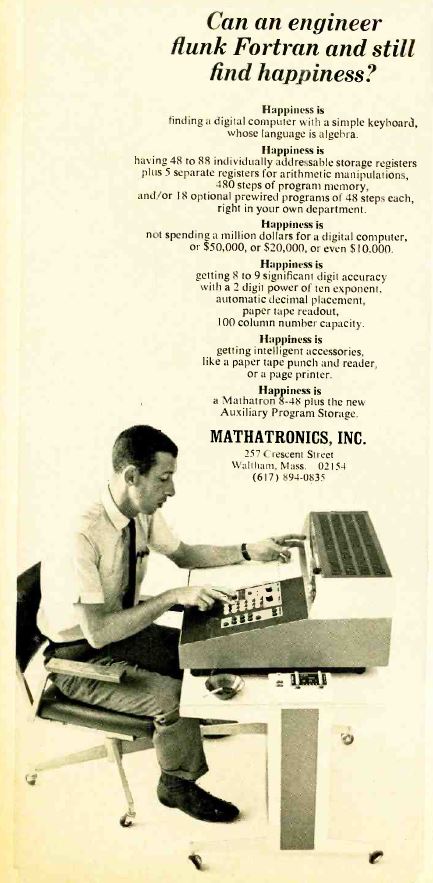
Advertisement for Mathatronics Mathatron 8-48 calculator with APS Expansion Unit Electronics March, 1966
This advertisement shows an original Mathatronics Mathatron 8-48 Version I
calculator, (the Version I calculator used rotary switches to select operating
mode and pre-programmed advanced mathematical functions, while the
Version II Mathatron
calculators had individual keyboard keys for these functions) with the
"Add Under" Auxiliary Program Storage (APS) unit, housed in wheeled
table that the calculator is sitting on. The APS expansion provides ten times
the number of learn-mode program steps; eighteen read-only pre-programmed
48-step programs; and six to eleven times the number
of numeric memory registers, along with enhanced peripheral connectivity
features. The expanded memory of the APS was implemented
using magnetostrictive delay line technology, because the quantity of memory
involved was too expensive to implement with magnetic core memory.
This expansion unit made the Mathatron calculator
into what one could practically call a small
personal computer. With the addition of the expansion unit,
the 8-48 calculator was capable of fairly
advanced calculating capabilities, available only on much more expensive
computer systems at the time. While the Mathatron wasn't nearly as fast
as computers of the time, it was very simple to
use and program, and allowed operators to perform complex mathematical
operations with little training, which the advertisement flaunts by
implying that writing programs on the expanded Mathatron is much less
difficult than writing programs on larger computers in the FORTRAN
programming language.
The expansion unit connects to the Mathatron
calculator via a large connector on the bottom panel of the calculator.
The calculator is bolted to the table, and the electronics providing the
additional functions are housed in the spine of the table. Locking casters
on the expansion unit make it much easier to move around the 80+ pound
Mathatron calculator.
Various controls and status indicators for the expansion unit are located
on the small console on the right side of the calculator.